



Skip to content
View in the app

A better way to browse. Learn more.

Coldplaying

A full-screen app on your home screen with push notifications, badges and more.

To install this app on iOS and iPadOS
  1. Tap the Share icon in Safari
  2. Scroll the menu and tap Add to Home Screen.
  3. Tap Add in the top-right corner.
To install this app on Android
  1. Tap the 3-dot menu (⋮) in the top-right corner of the browser.
  2. Tap Add to Home screen or Install app.
  3. Confirm by tapping Install.

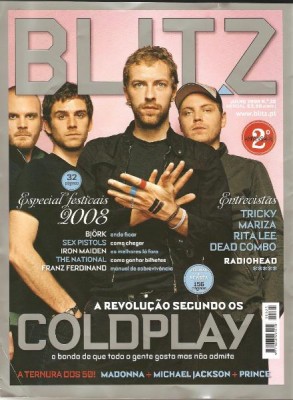
Blitz Magazine (Portugal) July 2008: Coldplay ‘Long Live The Revolution’

Cover:

“The revolution according to Coldplay”

“The band that everyone likes but doesn’t admit”


Article:

“Long live the revolution”

“In the eve of their return, Coldplay invited James McMahon to visit their secret headquarters. He found a band insecure about its past, but with a new and dashing musical manifesto (or something). The revolution of Viva la Vida is served hot.”


“Somewhere in the north of London, where Camden ends and Primrose Hill begins, in the middle of a nameless alley, there is an old bakery. It isnt used for years, at least for making bread. It isn’t the type of place where it is expected to be the cradle of one of the most discussed musical returns of the year.


See the scans and read the full article here [thanks Live4Coldplay]


blitz.jpg

User Feedback

Recommended Comments

There are no comments to display.

Guest
This is now closed for further comments

Account

Navigation

Search

Search

Configure browser push notifications

Chrome (Android)
  1. Tap the lock icon next to the address bar.
  2. Tap Permissions → Notifications.
  3. Adjust your preference.
Chrome (Desktop)
  1. Click the padlock icon in the address bar.
  2. Select Site settings.
  3. Find Notifications and adjust your preference.