



Skip to content
View in the app

A better way to browse. Learn more.

Coldplaying

A full-screen app on your home screen with push notifications, badges and more.

To install this app on iOS and iPadOS
  1. Tap the Share icon in Safari
  2. Scroll the menu and tap Add to Home Screen.
  3. Tap Add in the top-right corner.
To install this app on Android
  1. Tap the 3-dot menu (⋮) in the top-right corner of the browser.
  2. Tap Add to Home screen or Install app.
  3. Confirm by tapping Install.

[01/02/2008] New Prospekt Entry On Coldplay.com 2008 | One Month To Go

Check out the 2008 section of Coldplay.com for a new star.


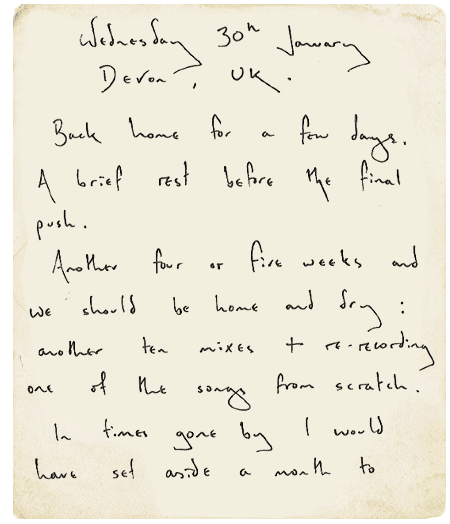
Wednesday 30th January (2008)

Devon, UK


Back home for a few days. A brief rest before the final push.


Another four or five weeks and we should be home and dry: another ten mixes + re-recording one of the songs from scratch. In times gone by I would have set aside a month to re-record a track. However, the week before Christmas, we recorded two tracks in four days - Lovers In Japan and Strawberry Swing. On the fifth day (Friday), Chris put down new lyrics (and new melodies) on two other tracks. It was far and away the most productive and exciting week we've ever had in the studio. I was buzzing all through Christmas.


Since then, mixing has been slow and painstaking but that's just the nature of the beast. So... give us another month or so and we might just have an album worthy of your patience.


Prospekt.

PS - album title ≠ prospekt!


More on this here onwards [thanks IneedYou23]


Read the full chronology, including all Prospekt updates, at WikiColdplay


2008_02_01_001.png


2008_02_01_002.png


2008_02_01_003.png


2008_02_01_004.png

User Feedback

Recommended Comments

There are no comments to display.

Guest
This is now closed for further comments

Account

Navigation

Search

Search

Configure browser push notifications

Chrome (Android)
  1. Tap the lock icon next to the address bar.
  2. Tap Permissions → Notifications.
  3. Adjust your preference.
Chrome (Desktop)
  1. Click the padlock icon in the address bar.
  2. Select Site settings.
  3. Find Notifications and adjust your preference.