



Skip to content
View in the app

A better way to browse. Learn more.

Coldplaying

A full-screen app on your home screen with push notifications, badges and more.

To install this app on iOS and iPadOS
  1. Tap the Share icon in Safari
  2. Scroll the menu and tap Add to Home Screen.
  3. Tap Add in the top-right corner.
To install this app on Android
  1. Tap the 3-dot menu (⋮) in the top-right corner of the browser.
  2. Tap Add to Home screen or Install app.
  3. Confirm by tapping Install.

[03/01/2008] New Star On Coldplay.com 2005 | Fix You Video

Check out the 2005 section of Coldplay.com for a new star.


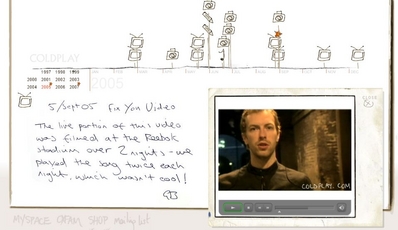
5th September 2005 - Fix You Video

The live portion of this video was filmed at the Reebok Stadium over 2 nights - we played the song twice each night, which wasn’t cool!*

*[Yes it was, I was there! - Ian]


You can watch the video here. More on this star here onwards [thanks *Becky*]


Read the full chronology, including all Prospekt updates, at WikiColdplay


normal_fixyou.jpg

User Feedback

Recommended Comments

There are no comments to display.

Guest
This is now closed for further comments

Account

Navigation

Search

Search

Configure browser push notifications

Chrome (Android)
  1. Tap the lock icon next to the address bar.
  2. Tap Permissions → Notifications.
  3. Adjust your preference.
Chrome (Desktop)
  1. Click the padlock icon in the address bar.
  2. Select Site settings.
  3. Find Notifications and adjust your preference.