



Skip to content
View in the app

A better way to browse. Learn more.

Coldplaying

A full-screen app on your home screen with push notifications, badges and more.

To install this app on iOS and iPadOS
  1. Tap the Share icon in Safari
  2. Scroll the menu and tap Add to Home Screen.
  3. Tap Add in the top-right corner.
To install this app on Android
  1. Tap the 3-dot menu (⋮) in the top-right corner of the browser.
  2. Tap Add to Home screen or Install app.
  3. Confirm by tapping Install.

[11/03/2008] New Star On Coldplay.com 2004 | Garden State "Don't Panic"

Check out the 2004 section of Coldplay.com for a new star.


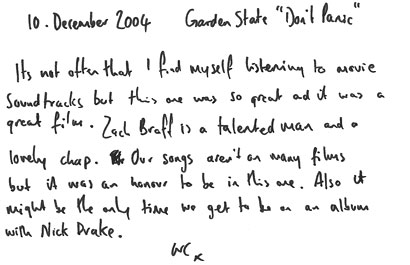
10 December 2004 - Garden State "Don't Panic"

It's not that often that I find myself listening to movie soundtracks but this one was so great and it was a great film. Zach Braff is a talented man and a lovely chap. Our songs aren't on many films but it was an honour to be in this one. Also it might be the only time we get to be on an album with Nick Drake.

WC x


More on this star here onwards [thanks kmm1482 & mimixxx]


Read the full chronology, including all Prospekt updates, at WikiColdplay


2004_10_12_WC.jpg

2004_10_12_001.png

User Feedback

Recommended Comments

There are no comments to display.

Guest
This is now closed for further comments

Account

Navigation

Search

Search

Configure browser push notifications

Chrome (Android)
  1. Tap the lock icon next to the address bar.
  2. Tap Permissions → Notifications.
  3. Adjust your preference.
Chrome (Desktop)
  1. Click the padlock icon in the address bar.
  2. Select Site settings.
  3. Find Notifications and adjust your preference.