



Skip to content
View in the app

A better way to browse. Learn more.

Coldplaying

A full-screen app on your home screen with push notifications, badges and more.

To install this app on iOS and iPadOS
  1. Tap the Share icon in Safari
  2. Scroll the menu and tap Add to Home Screen.
  3. Tap Add in the top-right corner.
To install this app on Android
  1. Tap the 3-dot menu (⋮) in the top-right corner of the browser.
  2. Tap Add to Home screen or Install app.
  3. Confirm by tapping Install.

[24/10/2007] New Star On Coldplay.com 1999 | XFM Brothers & Sisters

Check out the 1999 section of Coldplay.com for a new star.


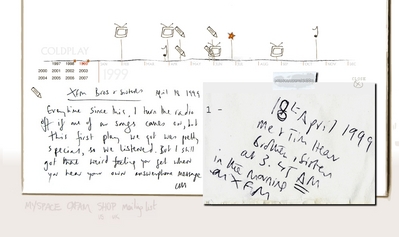
XFM Brothers & Sisters - 18th April 1999

Every time since this, I turn the radio off if any of our songs comes on, but this first play we got was pretty special, so we listened. But I still got that weird feeling you get when you hear your own answerphone message.

CM


You can discuss this star here onwards.


normal_xfmbrossis.jpg


User Feedback

Recommended Comments

There are no comments to display.

Guest
This is now closed for further comments

Account

Navigation

Search

Search

Configure browser push notifications

Chrome (Android)
  1. Tap the lock icon next to the address bar.
  2. Tap Permissions → Notifications.
  3. Adjust your preference.
Chrome (Desktop)
  1. Click the padlock icon in the address bar.
  2. Select Site settings.
  3. Find Notifications and adjust your preference.