



Skip to content
View in the app

A better way to browse. Learn more.

Coldplaying

A full-screen app on your home screen with push notifications, badges and more.

To install this app on iOS and iPadOS
  1. Tap the Share icon in Safari
  2. Scroll the menu and tap Add to Home Screen.
  3. Tap Add in the top-right corner.
To install this app on Android
  1. Tap the 3-dot menu (⋮) in the top-right corner of the browser.
  2. Tap Add to Home screen or Install app.
  3. Confirm by tapping Install.

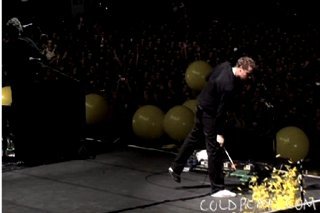
[28/08/2007] New Star On Coldplay.com 2005 | Balloons...!

Check out the 2005 section of Coldplay.com for a new star.


Balloons.. Sept./05

"We started dropping huge balloons on the audience. They always end up on the stage for Chris to burst. Tempers have been known to fray when the balloons haven't been blown up enough. It's very important to get balloon pressure correct."

GB


More on this here [thanks ColdplayBirdsFly]


ColdplayYellow-Jonny.jpgColdplayYellow-Balloon.jpg


User Feedback

Recommended Comments

There are no comments to display.

Guest
This is now closed for further comments

Account

Navigation

Search

Search

Configure browser push notifications

Chrome (Android)
  1. Tap the lock icon next to the address bar.
  2. Tap Permissions → Notifications.
  3. Adjust your preference.
Chrome (Desktop)
  1. Click the padlock icon in the address bar.
  2. Select Site settings.
  3. Find Notifications and adjust your preference.