



Skip to content
View in the app

A better way to browse. Learn more.

Coldplaying

A full-screen app on your home screen with push notifications, badges and more.

To install this app on iOS and iPadOS
  1. Tap the Share icon in Safari
  2. Scroll the menu and tap Add to Home Screen.
  3. Tap Add in the top-right corner.
To install this app on Android
  1. Tap the 3-dot menu (⋮) in the top-right corner of the browser.
  2. Tap Add to Home screen or Install app.
  3. Confirm by tapping Install.

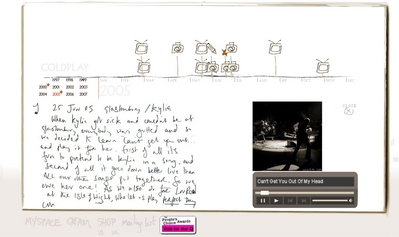
[28/09/2007] New Star On Coldplay.com 2005 | Kylie @ Glastonbury

Check out the 2005 section of Coldplay.com for a new star.


When Kylie got sick and couldn’t be at Glastonbury, everybody was gutted and so we decided to learn ‘Can’t Get You Out…’ and play it for her. First of all it’s fun to pretend to be Kylie in a song and second of all it goes down better live than all our other songs put together.

So, we owe her one! As we also do for Lou Reed at the Isle of Wight, who let us play ‘Perfect Day’.

CM


You can discuss this star here [thanks alio]


normal_kylieglasto.jpg

User Feedback

Recommended Comments

There are no comments to display.

Guest
This is now closed for further comments

Account

Navigation

Search

Search

Configure browser push notifications

Chrome (Android)
  1. Tap the lock icon next to the address bar.
  2. Tap Permissions → Notifications.
  3. Adjust your preference.
Chrome (Desktop)
  1. Click the padlock icon in the address bar.
  2. Select Site settings.
  3. Find Notifications and adjust your preference.