




 Babelgum has announced that it's developed an iPhone application specifically on Coldplay. The app includes video content, as well as a Coldplay news feed and a minigame.
The big inclusion is the video for the track Strawberry Swing, which was directed by a group of visual artists called Shynola, who have also worked with Beck, Blur, Junior Senior and Radiohead. The Strawberry Swing video is joined by all the band's previous videos, too.
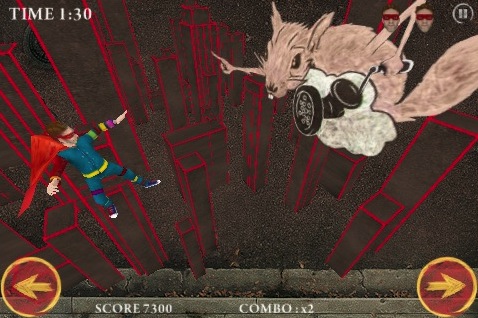
In the minigame included, Chris Martin "battles giant squirrels and sea monsters to rescue a princess". We're as confused as you are about that one, though it apparently replicates the Strawberry Swing video, so that might be what's going on.
Lastly, a news feed will give Coldplay fans the latest info, alongside competitions to win tickets and travel to see Coldplay's current world tour. The application is available now and costs nothing.
From Coldplay.com:
Good morning. Following Babelgum's exclusive premiere of the Strawberry Swing video, they have now launched a free application for the iPhone/iPod Touch which includes the Strawberry Swing video along with the Coldplay video catalogue, a Coldplay news feed and a game based on the video. It's available to download from the iTunes store now. Click here to get it.
Here are a couple of screengrabs from the app's game:

Recommended Comments