



Skip to content
View in the app

A better way to browse. Learn more.

Coldplaying

A full-screen app on your home screen with push notifications, badges and more.

To install this app on iOS and iPadOS
  1. Tap the Share icon in Safari
  2. Scroll the menu and tap Add to Home Screen.
  3. Tap Add in the top-right corner.
To install this app on Android
  1. Tap the 3-dot menu (⋮) in the top-right corner of the browser.
  2. Tap Add to Home screen or Install app.
  3. Confirm by tapping Install.

Coldplay In Pictures: LA Times

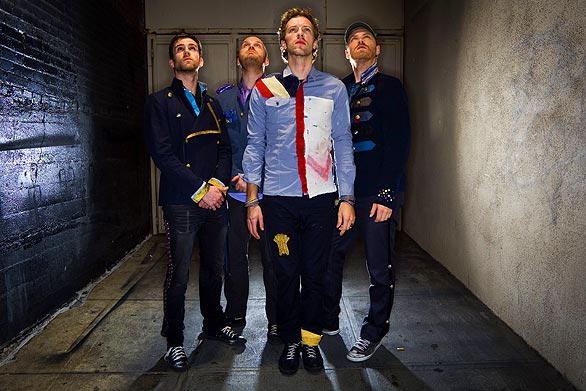
The band Coldplay is photographed in an alleyway outside the “Jimmy Kimmel Live” studio in Hollywood this month. From left, bassist Guy Berryman, drummer Will Champion, singer-keyboardist Chris Martin and guitarist Jonny Buckland:


40101256.jpg

Chris Martin, lead singer of Coldplay, signs an autograph for a fan outside the “Jimmy Kimmel LIve” studio in Hollywood:


40101279.jpg


Fans wait their turn to meet Coldplay singer Chris Martin outside the “Jimmy Kimmel LIve” studio in Hollywood:


40101283.jpg


Guy Berryman, left, and Chris Martin of Coldplay greet and pose with fans in an alleyway outside the “Jimmy Kimmel Live” studio. The band performed two songs from its new “Viva la Vida” album on the show:


40101376.jpg


Chris Martin poses with a self-photographing fan:


40101401.jpg


Fans, fans and more fans — it’s all in the course of a meet-and-greet session for Chris Martin:


40101405.jpg


Coldplay performs the title track from its new album, “Viva la Vida,” at the MTV Movie Awards on June 1:


40101414.jpg


Confetti flutters down on singer Chris Martin during the band’s performance at the MTV Movie Awards in Los Angeles:


40101417.jpg


Source: latimes.com/

User Feedback

Recommended Comments

There are no comments to display.

Guest
This is now closed for further comments

Account

Navigation

Search

Search

Configure browser push notifications

Chrome (Android)
  1. Tap the lock icon next to the address bar.
  2. Tap Permissions → Notifications.
  3. Adjust your preference.
Chrome (Desktop)
  1. Click the padlock icon in the address bar.
  2. Select Site settings.
  3. Find Notifications and adjust your preference.