


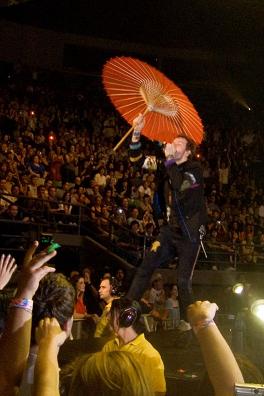

Coldplay played the final night of three consecutive Melbourne concerts as they continue through their Australian Viva La Vida tour. Two changes to the generic setlist - Glass of Water replaced Chinese Sleep Chant... as it was last night, and Green Eyes was also replaced by an acoustic version of Neil Diamond's I'm A Believer...
[discussion] [photos] [videos] [wiki reviews/setlist] (updated over the next 24 hours)
Setlist: [thanks ilovealias4ever]
Life In Technicolor
Violet Hill
 Clocks
In My Place
Yellow
Cemeteries Of London
Glass Of Water
42
Fix You
Strawberry Swing
God Put A Smile Upon Your Face (techno version)
Talk (techno version)
The Hardest Part (Chris piano, Will)
Postcards From Far Away (piano instrumental)
Viva La Vida
Lost!
Speed Of Sound (acoustic)
I'm A Believer (acoustic)
Death Will Never Conquer (acoustic - Will vocals)
Viva La Vida (remix interlude)
------
Politik
Lovers In Japan
Death And All His Friends
-------
The Scientist
Life in Technicolor ii
The Escapist (outro)
Just Amazing. Again, I don't have time to write a complete review tonight -- I must get to bed. But I will say I enjoyed myself far better than last night -- GA. All. The. Way. Setlist -- same as last night, except 'Green Eyes' was switched out for 'I'm A Believer'. (Yep, 'Glass Of Water' was played again instead of 'Chinese Sleep Chant'). [thanks ilovealias4ever]
More on this concert including reviews, videos and pictures here onwards.
Recommended Comments