



Skip to content
View in the app

A better way to browse. Learn more.

Coldplaying

A full-screen app on your home screen with push notifications, badges and more.

To install this app on iOS and iPadOS
  1. Tap the Share icon in Safari
  2. Scroll the menu and tap Add to Home Screen.
  3. Tap Add in the top-right corner.
To install this app on Android
  1. Tap the 3-dot menu (⋮) in the top-right corner of the browser.
  2. Tap Add to Home screen or Install app.
  3. Confirm by tapping Install.

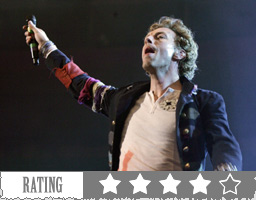
Coldplay @ Madison Square Garden 23/06/2008

NEW YORK - Yes, there were mistakes and technical glitches.


But about 10,000 lucky contest winners from all over the world who attended Coldplay's only free concert in North America at Madison Square Garden on Monday night, which followed similar events in London and Barcelona last week, didn't seem to mind the-less-than perfect show one little bit.


In fact, as the hour-and-10-minute concert emptied out, fans could be heard singing the rousing chorus of the title track from Coldplay's week-old new album, Viva La Vida, which has become the group's first ever No. 1 single in both England and the U.S.


Read the full reviews here. You can see photos from the show here, here and here


c256.jpg

User Feedback

Recommended Comments

There are no comments to display.

Guest
This is now closed for further comments

Account

Navigation

Search

Search

Configure browser push notifications

Chrome (Android)
  1. Tap the lock icon next to the address bar.
  2. Tap Permissions → Notifications.
  3. Adjust your preference.
Chrome (Desktop)
  1. Click the padlock icon in the address bar.
  2. Select Site settings.
  3. Find Notifications and adjust your preference.