


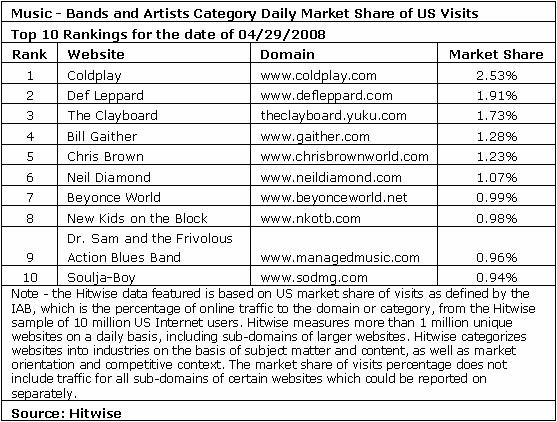

US visits to Coldplay.com increased 1,800% since the band's new single, Violet Hill, was released for free online, Hitwise said after comparing the daily US visits for April 29, 2008 versus April 27, 2008, MarketingCharts reports.
On April 29, 2008, the day the single was released on Coldplay.com, the website ranked as the most visited website among the Bands and Artists category. A little more than 1 out of every 40 visits to Bands and Artists category went to Coldplay's website.

Two days before the release of the single, the website ranked number 305 among Bands and Artists websites from more than 500 websites in the category. "While publishers become increasingly concerned about the cannibalization of their revenue stream, experiments by Coldplay and Radiohead at a minimum prove that free music downloads provide added publicity to increase awareness for album releases," said Bill Tancer, general manager of global research, Hitwise.
Those seeking the single were emailed a link for the download. More than half - 52.33% - of visits to Coldplay.com came from a website in the Email Services category on April 29, 2008, indicating that fans were eager to receive the download, Hitwise said.
Recommended Comments