



Skip to content
View in the app

A better way to browse. Learn more.

Coldplaying

A full-screen app on your home screen with push notifications, badges and more.

To install this app on iOS and iPadOS
  1. Tap the Share icon in Safari
  2. Scroll the menu and tap Add to Home Screen.
  3. Tap Add in the top-right corner.
To install this app on Android
  1. Tap the 3-dot menu (⋮) in the top-right corner of the browser.
  2. Tap Add to Home screen or Install app.
  3. Confirm by tapping Install.

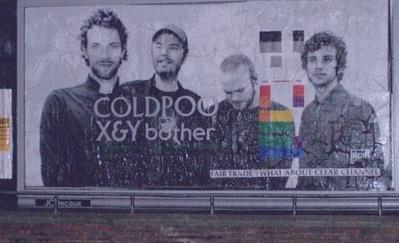
Derogatory Coldplay Poster Paster Found

Who was responsible for the derogatory Coldplay poster that was put up during the Brits ceremony? Well, now we know...


“This evening at 10:00 pm dr.d hit a billboard bang opposite the Brit awards, the British music industry’s annual self-congratulatory love-fest. For all their talk of fair trade, presumably Chris Martin and the other boys in Coldplay do not mind performing at a heavily policed event sponsored by Mastercard from which the people who actually buy their CDs are excluded. They also do not seem to object to having their gigs and records promoted by Clear Channel, a company which now pretty much has a monopoly in the promotion of recordings and the staging of events….”


All the best,

Mother


http://www.woostercollective.com/brits2006poster.jpg

User Feedback

Recommended Comments

There are no comments to display.

Guest
This is now closed for further comments

Account

Navigation

Search

Search

Configure browser push notifications

Chrome (Android)
  1. Tap the lock icon next to the address bar.
  2. Tap Permissions → Notifications.
  3. Adjust your preference.
Chrome (Desktop)
  1. Click the padlock icon in the address bar.
  2. Select Site settings.
  3. Find Notifications and adjust your preference.