



Skip to content
View in the app

A better way to browse. Learn more.

Coldplaying

A full-screen app on your home screen with push notifications, badges and more.

To install this app on iOS and iPadOS
  1. Tap the Share icon in Safari
  2. Scroll the menu and tap Add to Home Screen.
  3. Tap Add in the top-right corner.
To install this app on Android
  1. Tap the 3-dot menu (⋮) in the top-right corner of the browser.
  2. Tap Add to Home screen or Install app.
  3. Confirm by tapping Install.

Did You Win Tickets to Coldplay at MSG on June 23rd?

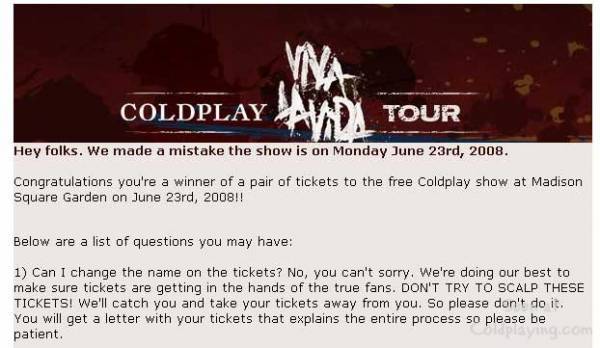
A few hours ago an email went out to the winners of the free ticket giveaway for Coldplay’s June 23rd show at Madison Square Garden to promote the new album, Viva la Vida Or Death And All His Friends. Then about an hour later, another email was sent out correcting the date (the original email said the show was on June 24th).


Tickets will be mailed out to winners on or around June 10th, and when they arrive the lucky concert-goers will find out the location of their seats. There is (at time of writing) no word yet on winners of the Brixton gig in London on 16th June (which will be live on Radio 1 if you haven't yet heard).


Winners are warned not to try to scalp their tickets. The email goes on to read, “We’ll catch you and take your tickets away from you. So please don’t do it. You will get a letter with your tickets that explains the entire process so please be patient.”


More on this (and discuss winners/losers) here [thanks Montreal]


coldplay_msnwin1.jpg

User Feedback

Recommended Comments

There are no comments to display.

Guest
This is now closed for further comments

Account

Navigation

Search

Search

Configure browser push notifications

Chrome (Android)
  1. Tap the lock icon next to the address bar.
  2. Tap Permissions → Notifications.
  3. Adjust your preference.
Chrome (Desktop)
  1. Click the padlock icon in the address bar.
  2. Select Site settings.
  3. Find Notifications and adjust your preference.