



Skip to content
View in the app

A better way to browse. Learn more.

Coldplaying

A full-screen app on your home screen with push notifications, badges and more.

To install this app on iOS and iPadOS
  1. Tap the Share icon in Safari
  2. Scroll the menu and tap Add to Home Screen.
  3. Tap Add in the top-right corner.
To install this app on Android
  1. Tap the 3-dot menu (⋮) in the top-right corner of the browser.
  2. Tap Add to Home screen or Install app.
  3. Confirm by tapping Install.

Drexel student to open for Coldplay, July 25th (New Coldplay Sign Campaign For This Date!)

Congratulations to Music Industry student Jonah Delso! Delso was selected to open for Coldplay on July 25 at the Wachovia Center, Philadelphia, PA, through a video contest run by local rock station 93.3 WMMR. Stay tuned for an interview with Delso in the July 25 issue of The Triangle, but for now, check out the winning video here


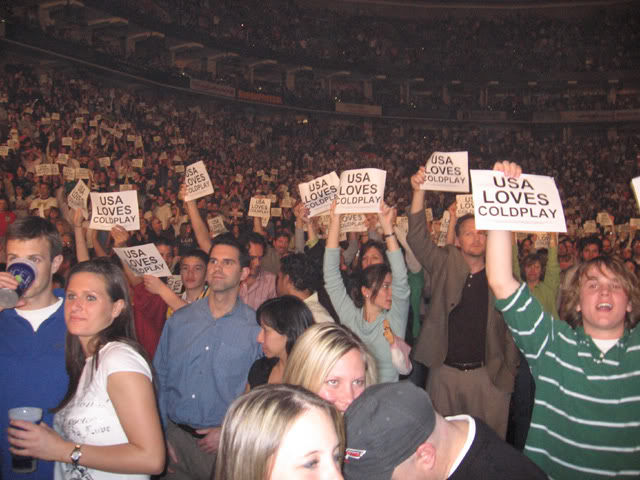
You may remember Coldplaying.com was involved in a campaign on 6th April 2006, courtesy of Coldplaying member jbarry5503, to distribute 12000 'USA Loves Coldplay' flyers at the Wachovia Center, during the final US Twisted Logic show last year.


For those Coldplayers who are interested in becoming a Coldplay sign gang participant again please follow the instructions here


phillysignsws.jpg

User Feedback

Recommended Comments

There are no comments to display.

Guest
This is now closed for further comments

Account

Navigation

Search

Search

Configure browser push notifications

Chrome (Android)
  1. Tap the lock icon next to the address bar.
  2. Tap Permissions → Notifications.
  3. Adjust your preference.
Chrome (Desktop)
  1. Click the padlock icon in the address bar.
  2. Select Site settings.
  3. Find Notifications and adjust your preference.