


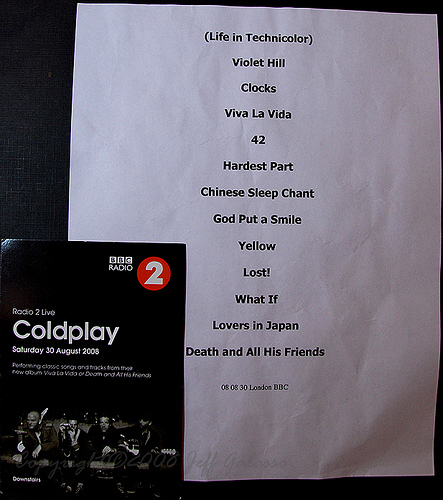

Coldplay's hour-long gig at the BBC Radio Theatre in London is over. They played:
1. Life In Technicolor
2. Violet Hill
3. Clocks
4. Viva La Vida (dedicated to Terry Wogan)
5. 42
6. The Hardest Part aka. Ego Trip (Chris M. acoustic)
7. Chinese Sleep Chant
8. God Put A Smile Upon Your Face (techno v-v-v-ersion)
9. Yellow (dedicated to Radio 2)
10. Lost!
11. Trouble
12. The Scientist (full version)
13. Lovers In Japan (dedicated to Dermot O'Leary)
encore
14. Death And All His Friends (dedicated to Phil Harvey, the 5th member of Coldplay)
15. Strawberry Swing (not aired on radio)
Listen again to the whole gig via the BBC iPlayer webstream or download in MP3 format via megaupload [thanks fixed & open6l]
More audio/visual links, pictures and reviews to follow... eyes and ears peeled!
Guy Berryman's setlist from the BBC Radio gig. "What If" was dropped for "Trouble" which Chris immediately followed with "The Scientist", much to the surprise of his bandmates. After the radio show ended, Coldplay returned to the stage to close with "Strawberry Swing". [thanks Jeff]

Recommended Comments