



Skip to content
View in the app

A better way to browse. Learn more.

Coldplaying

A full-screen app on your home screen with push notifications, badges and more.

To install this app on iOS and iPadOS
  1. Tap the Share icon in Safari
  2. Scroll the menu and tap Add to Home Screen.
  3. Tap Add in the top-right corner.
To install this app on Android
  1. Tap the 3-dot menu (⋮) in the top-right corner of the browser.
  2. Tap Add to Home screen or Install app.
  3. Confirm by tapping Install.

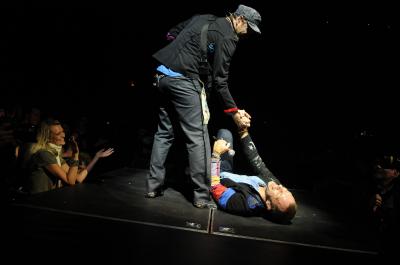
[Live Review] Coldplay @ Colorline Arena, Hamburg, Germany (14th September 2008)

Setlist:


Life In Technicolor

Violet Hill

Clocks

In My Place

Speed Of Sound

Cemeteries Of London

qni9a.jpg Chinese Sleep Chant

42

Fix You

Strawberry Swing

God Put A Smile Upon Your Face (techno version)

Talk (partial - techno version)

The Hardest Part (piano - Chris)

Postcards From Far Away (piano instrumental)

Viva La Vida

Lost!

The Scientist (acoustic)

Death Will Never Conquer (acoustic - Will singing)

Viva La Vida (remix interlude)

------- First Encore

Politik

Lovers In Japan

Death And All His Friends

------- Second Encore

Yellow

The Escapist


[discussion] [photos] [videos] [wiki reviews/setlist] (updated over the next 24 hours)


"It was amazing. No surprises with the songs" I guess it was the same setlist as Koln then? He said, he , Sarah and Felix are waiting to meet the band but have been told they've gone back to London (?!?!?!?! Surely not...if they're playing Berlin tomorrow?) but they met the support band.

Perhaps the boys will still be there maybe. hmmmmm [thanks Larry & crazyduckette]


More on this show here onwards [thanks melanieau & qnibert00]

qni10.jpg


qni12.jpg


qni13.jpg


qni14.jpg


qni20.jpg


qni23.jpg


qni24.jpg


qni28.jpg


qni31.jpg


qni30.jpg

User Feedback

Recommended Comments

There are no comments to display.

Guest
This is now closed for further comments

Account

Navigation

Search

Search

Configure browser push notifications

Chrome (Android)
  1. Tap the lock icon next to the address bar.
  2. Tap Permissions → Notifications.
  3. Adjust your preference.
Chrome (Desktop)
  1. Click the padlock icon in the address bar.
  2. Select Site settings.
  3. Find Notifications and adjust your preference.