



Skip to content
View in the app

A better way to browse. Learn more.

Coldplaying

A full-screen app on your home screen with push notifications, badges and more.

To install this app on iOS and iPadOS
  1. Tap the Share icon in Safari
  2. Scroll the menu and tap Add to Home Screen.
  3. Tap Add in the top-right corner.
To install this app on Android
  1. Tap the 3-dot menu (⋮) in the top-right corner of the browser.
  2. Tap Add to Home screen or Install app.
  3. Confirm by tapping Install.

New Coldplay Merchandise In The US Store

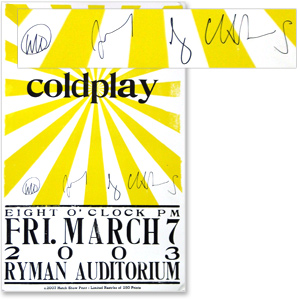
You may remember that back in March, we asked if there was any new Coldplay merchandise that you folks would like - and more than 500 of you were kind enough to reply. Well, the US merch store has taken on board these suggestions and has launched a bunch of new lines.


They include mousepads, a kids' t-shirt, a cap, a women's t-shirt, and a new poster. The poster is a re-strike of the original Hatch Show Print from the Ryman Auditorium Show in 2003. The shop is offering a limited amount of them autographed by the entire band (as shown above) of which 10% of the proceeds go to MusiCares.


Click here to head over to the store and check out the new lines. The Coldplay teapots are, we assume, still in the production stage...


C9AP03.jpg


Source: http://myspace.com/coldplay

User Feedback

Recommended Comments

There are no comments to display.

Guest
This is now closed for further comments

Account

Navigation

Search

Search

Configure browser push notifications

Chrome (Android)
  1. Tap the lock icon next to the address bar.
  2. Tap Permissions → Notifications.
  3. Adjust your preference.
Chrome (Desktop)
  1. Click the padlock icon in the address bar.
  2. Select Site settings.
  3. Find Notifications and adjust your preference.