



Skip to content
View in the app

A better way to browse. Learn more.

Coldplaying

A full-screen app on your home screen with push notifications, badges and more.

To install this app on iOS and iPadOS
  1. Tap the Share icon in Safari
  2. Scroll the menu and tap Add to Home Screen.
  3. Tap Add in the top-right corner.
To install this app on Android
  1. Tap the 3-dot menu (⋮) in the top-right corner of the browser.
  2. Tap Add to Home screen or Install app.
  3. Confirm by tapping Install.

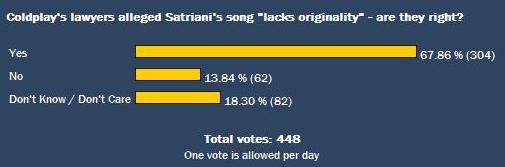
Poll: Coldplay's lawyers alleged Satriani's song "lacks originality" - are they right?

If the voters in our latest poll manage to get on to the jury in the Coldplay/Satriani case, our boys from London will have nothing to worry about. So far, 70% of you suggested that Satriani's song did "lack originality", which seemed to reflect the analysis of the

clip we posted a few days back. Voting continues.


Howard E King, Satriani's lawyer, called Coldplay's response "typical" for copyright infringement cases. This criticism is hardly damning, but then again King is not trying to make enemies. He reiterated yesterday that his client would like to see the matter settled out of court. Coldplay have so far resisted paying Satriani. "If there are any similarities between our two pieces of music," they said in an earlier statement, "they are entirely coincidental and just as surprising to us as to him."


satrianipoll.jpg

User Feedback

Recommended Comments

There are no comments to display.

Guest
This is now closed for further comments

Account

Navigation

Search

Search

Configure browser push notifications

Chrome (Android)
  1. Tap the lock icon next to the address bar.
  2. Tap Permissions → Notifications.
  3. Adjust your preference.
Chrome (Desktop)
  1. Click the padlock icon in the address bar.
  2. Select Site settings.
  3. Find Notifications and adjust your preference.