



Skip to content
View in the app

A better way to browse. Learn more.

Coldplaying

A full-screen app on your home screen with push notifications, badges and more.

To install this app on iOS and iPadOS
  1. Tap the Share icon in Safari
  2. Scroll the menu and tap Add to Home Screen.
  3. Tap Add in the top-right corner.
To install this app on Android
  1. Tap the 3-dot menu (⋮) in the top-right corner of the browser.
  2. Tap Add to Home screen or Install app.
  3. Confirm by tapping Install.

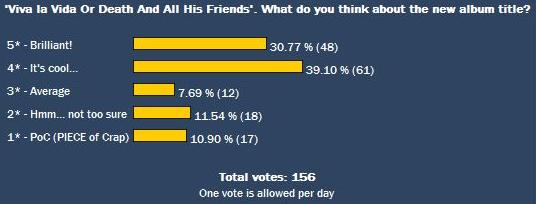
[Poll] What Do You Think Of The Album Title 'Viva la Vida Or Death And All His Friends'?

Coldplay fans around the world are getting used to the new album title 'Viva la Vida Or Death And All His Friends'. Early poll indications suggest that it has been well received, certainly better than 'Viva la Vida' on its own.


To add your vote, click here


A full report from Coldplay’s studio sessions for 'Viva la Vida Or Death And All His Friends', is expected at end of the week and may contain a tracklisting and dates for a possible single release or standalone track. Meanwhile, if you are interested in creating banners for this site (in 728x90 and 468x60 sizes) please submit them here. As always, all banners should include COLDPLAYING DOT COM in some large format somewhere.


VLVODAAHF_poll1.jpg

User Feedback

Recommended Comments

There are no comments to display.

Guest
This is now closed for further comments

Account

Navigation

Search

Search

Configure browser push notifications

Chrome (Android)
  1. Tap the lock icon next to the address bar.
  2. Tap Permissions → Notifications.
  3. Adjust your preference.
Chrome (Desktop)
  1. Click the padlock icon in the address bar.
  2. Select Site settings.
  3. Find Notifications and adjust your preference.