



Skip to content
View in the app

A better way to browse. Learn more.

Coldplaying

A full-screen app on your home screen with push notifications, badges and more.

To install this app on iOS and iPadOS
  1. Tap the Share icon in Safari
  2. Scroll the menu and tap Add to Home Screen.
  3. Tap Add in the top-right corner.
To install this app on Android
  1. Tap the 3-dot menu (⋮) in the top-right corner of the browser.
  2. Tap Add to Home screen or Install app.
  3. Confirm by tapping Install.

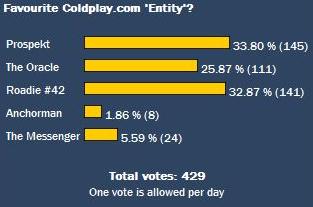
Prospekt and Roadie #42 go head-to-head in the Coldplaying poll!

We're close to hitting 500 votes for our latest poll, in which we asked you for your Favourite Coldplay.com 'Entity' from the LP4 era. So far the results are below - and they couldn't be closer. The Oracle needs votes because out in front currently neck and neck are Prospekt and Roadie #42, and with the European tour just around the corner Roadie is gathering momentum for a vicious assault on the poll results, exacerbated by Prospekt's lack of updates. You can continue to add to the voting tally by voting here.


Prospekt has missed the first monthly entry (July 2008) in over a year's worth of blog entries and it's unclear as to whether "he" will continue updating us all as we gather momentus towards Coldplay's new EP due for release on 26th December, 2008. An entry for August 2008 would be nice! (only one day to go...)


entity.jpg

User Feedback

Recommended Comments

There are no comments to display.

Guest
This is now closed for further comments

Account

Navigation

Search

Search

Configure browser push notifications

Chrome (Android)
  1. Tap the lock icon next to the address bar.
  2. Tap Permissions → Notifications.
  3. Adjust your preference.
Chrome (Desktop)
  1. Click the padlock icon in the address bar.
  2. Select Site settings.
  3. Find Notifications and adjust your preference.