




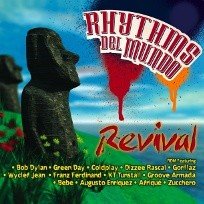
 Both AOL Radio Blog and Coldplay's official site are reporting this week that Coldplay and Lele, the singer from top Cuban band Los Van Van, collaborate on 'Clocks / Relojes,' a Cuban version of Coldplay's Top 10 hit 'Clocks,' highlighted on the Afro-Cuban relief effort album, 'Revival.'
The track is dominated by a more uplifting, Cuban mix full of conga and batá drums, trumpets and poppy piano, while Lele and Chris Martin's vocals interchange, as well as the hypnotic 'Clocks' piano melody with the new, revised one.
The album, 'Revival,' is currently available on iTunes, with all proceeds going to Artists Planet Earth. To hear the Cuban remix of 'Clocks,' head over to AOL Radio's Adult Rock station. If you're in the UK, Amazon have the CD here and the download here.
Back in 2006, a Cuban-styled version of Clocks featured on the Rhythms Del Mundo album, released by Artists Project Earth (APE), a UK organisation which focuses on disaster relief and climate change awareness.
The album, 'Revival,' was conceptualized by Rhythms Del Mundo (RDM) and their partnership with NGO Artists Project Earth (APE), to offer Afro-Cuban remixes of popular songs, while supporting relief efforts in Haiti, Chile, and Tibet. Other highlights on the album include Bob Dylan's 'A Hard Rain's a Gonna Fall,' Franz Ferdinand's 'The Dark of the Matinee,' and KT Tunstall's cover of Queen's hit 'Somebody to Love,' among others.
Recommended Comments