



Skip to content
View in the app

A better way to browse. Learn more.

Coldplaying

A full-screen app on your home screen with push notifications, badges and more.

To install this app on iOS and iPadOS
  1. Tap the Share icon in Safari
  2. Scroll the menu and tap Add to Home Screen.
  3. Tap Add in the top-right corner.
To install this app on Android
  1. Tap the 3-dot menu (⋮) in the top-right corner of the browser.
  2. Tap Add to Home screen or Install app.
  3. Confirm by tapping Install.

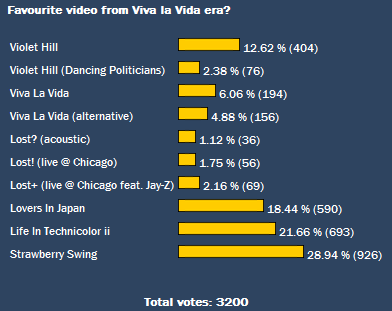
Strawberry Swing is your favourite Coldplay video from the Viva Era!

We've had a good response to our latest poll - over 3200 votes have been cast in just a few weeks. We asked you what your favourite video from Viva la Vida era was - and interestingly the last three videos that Coldplay put out are so far the most popular. Shynola's hard work on the Strawberry Swing is recognised as it gets the highest number of votes, followed by the creativity of the Life In Technicolor ii stage-show in second and the fast-paced Lovers In Japan follows closely in third.


You can add to the vote here - look out for more polls soon. The results so far in this poll are as follows:


bestvivavideo1a.png

divider.gif


More photos of Coldplay at Wembley stadium, London, UK (19th September 2009):


20090919tha5.jpg


20090919tha10.jpg


20090919tha20.jpg


20090919tha23.jpg


20090919tha26.jpg


20090919tha36.jpg


20090919tha37.jpg


20090919tha40.jpg


20090919tha44.jpg


20090919tha47.jpg


20090919tha56.jpg


20090919tha57.jpg


Photos by TheAngie


divider.gif


Our Wembley Coldplaying t-shirts are still on sale - don't miss out! (Click on the banners):


finaltt.png


divider.gif


Join the new Facebook page for more Coldplay news, reviews, setlists and links:


coldplayingfacebooksmall.jpg


User Feedback

Recommended Comments

There are no comments to display.

Guest
This is now closed for further comments

Account

Navigation

Search

Search

Configure browser push notifications

Chrome (Android)
  1. Tap the lock icon next to the address bar.
  2. Tap Permissions → Notifications.
  3. Adjust your preference.
Chrome (Desktop)
  1. Click the padlock icon in the address bar.
  2. Select Site settings.
  3. Find Notifications and adjust your preference.