



Skip to content
View in the app

A better way to browse. Learn more.

Coldplaying

A full-screen app on your home screen with push notifications, badges and more.

To install this app on iOS and iPadOS
  1. Tap the Share icon in Safari
  2. Scroll the menu and tap Add to Home Screen.
  3. Tap Add in the top-right corner.
To install this app on Android
  1. Tap the 3-dot menu (⋮) in the top-right corner of the browser.
  2. Tap Add to Home screen or Install app.
  3. Confirm by tapping Install.

Sun's Bizarre Boss Receives Colourful Goodbyes From Coldplay

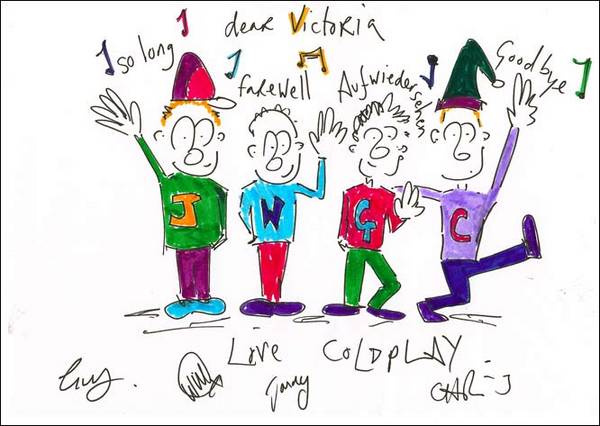
The Sun's 'Bizarre' Editor Vic was given a farewell present by Coldplay - a goodbye picture. Here's what she had to say about Coldplay:


I’m a huge fan of COLDPLAY and I have followed them since they first emerged as one of Britain’s best bands in 2000. I have interviewed CHRIS MARTIN a few times and bumped into him at different gigs during my time as Bizarre boss.


Chris, GUY, JONNY and WILL took time out at Coldplay HQ to draw the brilliant goodbye picture. Needless to say it will be framed and put in pride of place on a wall in my house.


More on this story here


14648.jpg

68910.jpg


User Feedback

Recommended Comments

There are no comments to display.

Guest
This is now closed for further comments

Account

Navigation

Search

Search

Configure browser push notifications

Chrome (Android)
  1. Tap the lock icon next to the address bar.
  2. Tap Permissions → Notifications.
  3. Adjust your preference.
Chrome (Desktop)
  1. Click the padlock icon in the address bar.
  2. Select Site settings.
  3. Find Notifications and adjust your preference.