


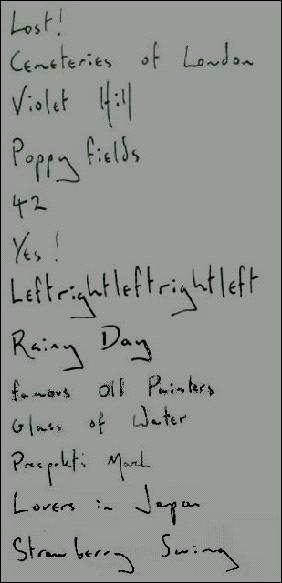

Contrary to reports and rumours, Coldplay's forthcoming album will not be called 'Prospekt', XFM report. Instead, it'll be called...
Actually, your guess is as good as ours because Coldplay are remaining tight-lipped over what their fourth album will be named. What we do know is that the follow-up to 2005's 'X&Y' is just a month away from completion.
In new posting on their website, Coldplay have denied that the new album is called 'Prospekt' but are refusing to reveal what the title will actually be. On a more positive note, the band has described recent sessions as "the most productive and exciting week we've ever had in the studio. Mixing has been slow and painstaking but that's just the nature of the beast. So...give us another month or so and we might just have an album worthy of your patience."
To listen to XFM live from your browser for on-air Coldplay updates from the heart of London and Manchester, click here to download the Coldplaying Toolbar. It also provides BBC Radio 1-4 which in the past have traditionally been used by Coldplay for live interviews and gigs.

News that Coldplay's Brian Eno-produced album is due for release in May will undoubtedly be greeted with joy as much by fans as EMI shareholders.


Recommended Comments