



Skip to content
View in the app

A better way to browse. Learn more.

Coldplaying

A full-screen app on your home screen with push notifications, badges and more.

To install this app on iOS and iPadOS
  1. Tap the Share icon in Safari
  2. Scroll the menu and tap Add to Home Screen.
  3. Tap Add in the top-right corner.
To install this app on Android
  1. Tap the 3-dot menu (⋮) in the top-right corner of the browser.
  2. Tap Add to Home screen or Install app.
  3. Confirm by tapping Install.

Coldplay Horoscope app update (Google Play)

Coldplay Horoscope


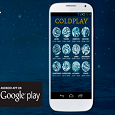
The super fun Coldplay Horoscope app is available to download exclusively on the Google Play store and displays your horoscope with your Coldplay song of the day! Developer, Rafael Bautista has updated the app to version 2 with various bug fixes and small improvements. The app is completely free to download.


To quote from the original release and for download information....


There is a new fun app available to download on the Google Play store! A kind programming Coldplayer, Rafael Bautista has provided this great phone app to Coldplaying's Google Play account which reads you a horoscope for your star sign. If star signs spark your interest, perfect! If its only superstition for you, the app also
gives you a Coldplay song for the day!
. Enjoy this funky new feature on your Android smartphone and a shoutout to other Leo Coldplayers with
Careful Where You Stand
as their chosen song!


The app is also available in Spanish!


User Feedback

Recommended Comments

There are no comments to display.

Guest
This is now closed for further comments

Account

Navigation

Search

Search

Configure browser push notifications

Chrome (Android)
  1. Tap the lock icon next to the address bar.
  2. Tap Permissions → Notifications.
  3. Adjust your preference.
Chrome (Desktop)
  1. Click the padlock icon in the address bar.
  2. Select Site settings.
  3. Find Notifications and adjust your preference.