



Skip to content
View in the app

A better way to browse. Learn more.

Coldplaying

A full-screen app on your home screen with push notifications, badges and more.

To install this app on iOS and iPadOS
  1. Tap the Share icon in Safari
  2. Scroll the menu and tap Add to Home Screen.
  3. Tap Add in the top-right corner.
To install this app on Android
  1. Tap the 3-dot menu (⋮) in the top-right corner of the browser.
  2. Tap Add to Home screen or Install app.
  3. Confirm by tapping Install.

Coldplaying Wins Absolute Radio Rock-Off Opener Against Official Keane Forum

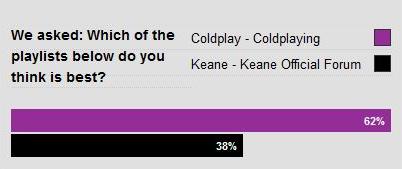
Coldplaying's Coldplay-filled playlist has won the opening match of Absolute Radio's Rock-Off forum competition against the Official Keane Forum, we are happy to announce tonight.


Coldplaying won by 62% - 38% after 28 hours of fierce voting - our next match will be against either the official Muse forum or Radiohead fansite Ateaseweb on 10th December 2008 - more details nearer the time. Thanks to everyone who has voted for Coldplaying, and a special thanks to Anchorman and Debs Wild at the official site for their support - I hope we can count on you again to further the Coldplay playlist into the competition!


Enjoy the result at our forum Absolute Radio Rock-Off thread here onwards.


coldplayingkeaneresult1.jpg

User Feedback

Recommended Comments

There are no comments to display.

Guest
This is now closed for further comments

Account

Navigation

Search

Search

Configure browser push notifications

Chrome (Android)
  1. Tap the lock icon next to the address bar.
  2. Tap Permissions → Notifications.
  3. Adjust your preference.
Chrome (Desktop)
  1. Click the padlock icon in the address bar.
  2. Select Site settings.
  3. Find Notifications and adjust your preference.