


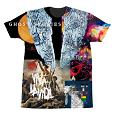

 Ever browsed through a selection of Coldplay merchandise, looked at a shirt and thought, 'if only that wasn't there' or 'wish that was there'? There is now a great solution that let's all Coldplayers design an individual T-shirt or piece of merchandise to their liking, with the glorious official album art and Coldplay logo's!Capcoldplay.com is an extension to the existing official store. The company who is working with Coldplay are the US based 'Cap-That' and because of their involvement, a variety of Coldplay merch, including : T-shirts, hoddies, socks, various accessories and even flip flops can be a Coldplayer's best friend!You can get 10% off the purchase price by using the code in the banner for a limit time (as Anchorman on the Coldplay.com announced).There is potential for some really great designs and some really erm...interesting ones too if you have a browse on the fan designs section! Here's one of them which was spotted by one of our mods on Coldplaying, Batman.
 Someone went a little bit overboard when designing their @Coldplay t-shirt! pic.twitter.com/MNnYoZF3EN
— Coldplay News (@coldplaying) November 22, 2014
Recommended Comments