



Skip to content
View in the app

A better way to browse. Learn more.

Coldplaying

A full-screen app on your home screen with push notifications, badges and more.

To install this app on iOS and iPadOS
  1. Tap the Share icon in Safari
  2. Scroll the menu and tap Add to Home Screen.
  3. Tap Add in the top-right corner.
To install this app on Android
  1. Tap the 3-dot menu (⋮) in the top-right corner of the browser.
  2. Tap Add to Home screen or Install app.
  3. Confirm by tapping Install.

Coldplay Announce North American Tour Dates!

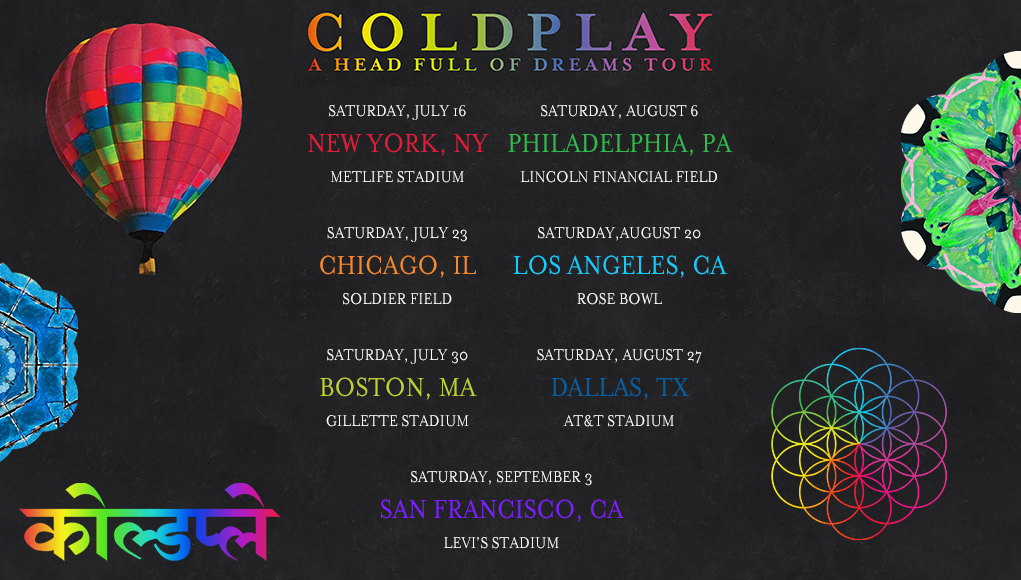
Coldplay have announced the first shows from the North American Leg of their A Head Full of Dreams tour!


Seven shows were announced this morning and fans went crazy! So crazy that Coldplay's site crashed due to the enormous amount of users looking for the dates.


All U.S. subscribers of the Coldplay mailing list (as of midnight PT Jan 27) will be sent a unique presale code today to use in the exclusive fan presale which begins at 10am local time tomorrow (Friday, Jan 29), on Ticketmaster. Please check your spam folder for the email.

Dates

Saturday, July 16

New York, NY

MetLife Stadium


Saturday, July 23

Chicago, IL

Soldier Field


Saturday, July 30

Boston, MA

Gillette Stadium


Saturday, August 6

Philadelphia, PA

Lincoln Financial Field


Saturday, August 20

Los Angeles, CA

Rose Bowl


Saturday, August 27

Dallas, TX

AT&T Stadium


Saturday, September 3

San Francisco, CA

Levi's Stadium

User Feedback

Recommended Comments

There are no comments to display.

Guest
This is now closed for further comments

Account

Navigation

Search

Search

Configure browser push notifications

Chrome (Android)
  1. Tap the lock icon next to the address bar.
  2. Tap Permissions → Notifications.
  3. Adjust your preference.
Chrome (Desktop)
  1. Click the padlock icon in the address bar.
  2. Select Site settings.
  3. Find Notifications and adjust your preference.