Jiwoo
Members
-
Joined
-
Last visited
-
Fortunately, I paid through PayPal and I bought it on Discogs. I’m gonna open a case following your advice! Thanks a lot!
-
Thank you for comment! Seller asserted it's genuine and reassured me haha I should contact him again
-
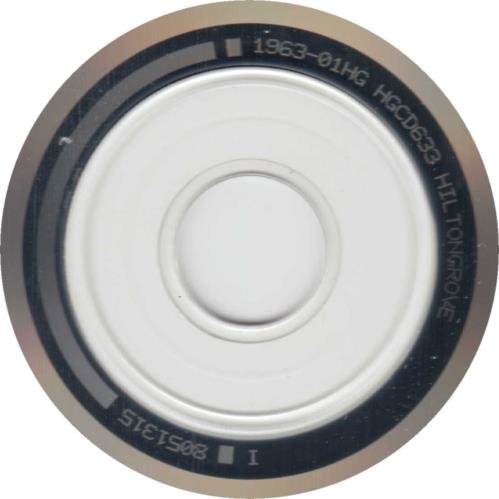
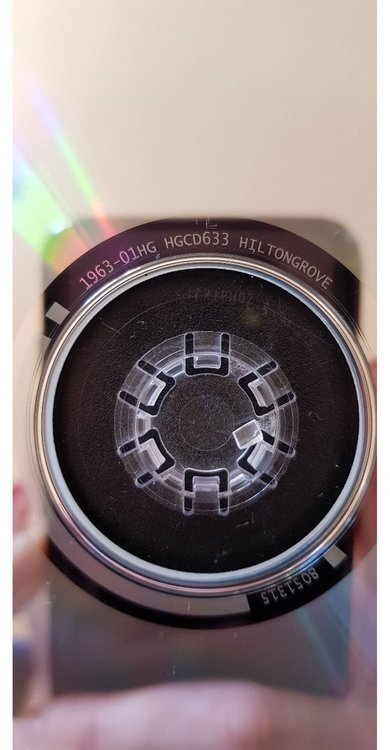
I heard the main way to recognise is font of matrix on back of cd but there are little pics of the back despite I tried to find so hard. I’d appreciate if anyone let me know how to authenticate or can compare yours with mine. First picture is one which is found on web and last one is same with mine.
-
Thanks I will do that
-
I will be at Cardiff and Paris
-
Thank you for answer just I give up:joy:
-
Oh my just I have to give up to get barrier
-
What do you mean? Then what he or she said is wrong?
-
Omg the system is really different with us. Anyway thank you!
-
Thank you for answer! then what time did you queue?
-
But I think they wouldn't stay only on Jonny's side:joy: EE ticket holders can get any spots, isn't it?
-
I will be at Cardiff and Paris
-
It was pm then!
-
12am? then I won't be able to get. Thank you for answer
-
I have just general admission ticket and really hope to get to barrier at A-stage especially. If I wait early in queue can I see at first row?