


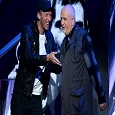

Coldplay lead singer, Chris Martin inducted Peter Gabriel, the lead singer of the historic progressive rock band, Genesis into the Rock n Roll Hall of Fame ceremony on Thursday night. Chris continued being his usual funny self, appearing to be reading from the book of Genesis while he read out, "An angel of the lord descended and appeared before Phil the Collins......and Phil the Collins said unto him, who are you O angel?" as Chris paused for a second, deep in character and relishing the speech before finishing with "I am Gabriel" to a round of applause as Peter Gabriel himself appearing on stage which was shortly followed by a one off special live duet of Washing Of The Water by Chris and Gabriel. You can watch the high quality video of Chris Martin's speech and part of the live performance below
You can discuss the ceremony on our forums here
(Thanks to Coeurli, Lily42 on our forums and the ColdplayUK Facebook page for the vids!)
https://www.youtube.com/watch?v=LK1r5EoMYl8
Below is another video of the highest quality amateur recording so far if you want to hear the full performance.
Only 37 days to go until the new Coldplay album of 2014, Ghost Stories is out!
Recommended Comments