MC01Coldplay
Members
-
Joined
-
Last visited
Everything posted by MC01Coldplay
-
well maybe it was a bit too easy don't panic was what I was looking for
-
nope so far
-
alright then heres one i think is actually pretty good:
-
oh, you got it first then. im having trouble coming up with a good riddle anyway so you can take your turn @Nie
-
oh so thats you meant by quarters. wow that was a good riddle. not sure how im going to be able to follow that...
-
first single from last album? Adventure of a Lifetime? also don't apologize, its way more fun when the riddles are so cryptic like this!
-
oh so would it be viva la vida (2nd single from 4th album)
-
haha i had to look up myself
-
so would it be the 3rd single from the 6th album or vice versa?
-
Yellow or White Shadows?
-
is it everglow?
-
sad
-
Violet Hill?
-
A Sky Full of Stars or Christmas Lights?
-
ooh is it Postcards from Far Away?
-
well we know it has to have a noun in the title then, right?
-
Birds?
-
is it Oceans?
-
I'm going to take a long shot here and say Crests of Waves
-
omg that's embarrassing. thats not really at all how numbers are written in america :/
-
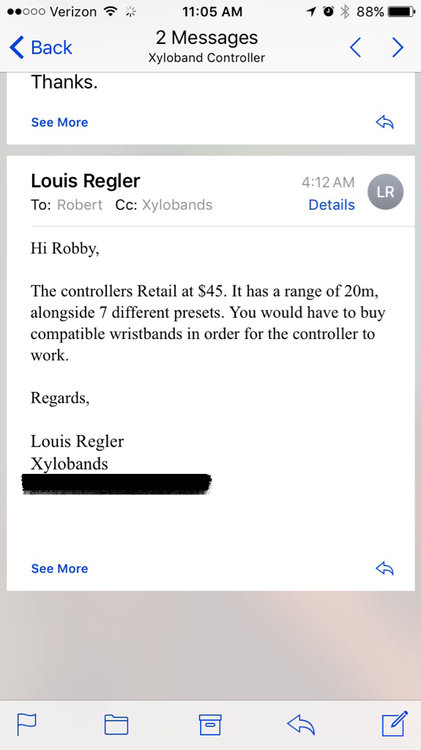
So I finally got an email back:
-
66929 damn it's crazy how far we've gotten but we still are only ~1/20 of the way through
-
-
-
A Rush of Blood to the Head?