Nie
Members
-
Joined
Everything posted by Nie
-
Shhhht, I'm almost recovered from those. Revenge? No bells yet?
-
Beroemde oude schilders Bucket For A Crown
-
-
Niet panikeren A Rush Of Blood To The Head
-
1 hint: guess coldplay song
-
Just a coincidence. That's not the bell (thread) I had in mind. [emoji14]
-
-
De kamer van de golven Vitamins
-
Fly up to the surface and just start again
-
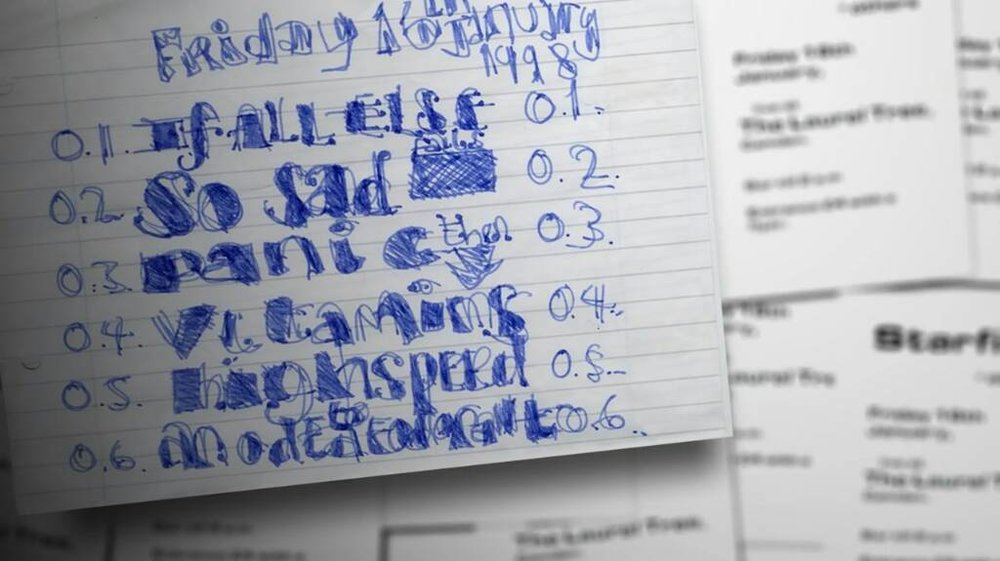
That setlist reads as some action plan or roadmap to me. [emoji1]
-
-
Does it ring any bells? [emoji14]
-
16th January 1998 - the first Starfish / Coldplay concert in Laurel Tree Camden So, today this setlist is celebrating its 19th birthday [emoji322]
-
You feel like you're going where you've been before
-
?? ? d??'? ???? ? ?????? ???? ????????? ?? ??d ? d??'? ???? ? ????? ?? ???????d ???????
-
It was also debuted today, 19 years ago [emoji1]
-
It's okay Oh, would I ever let you down? No way
-
I guess I can post a new one: ?? ? ???'? ???? ? ?????? ???? ????????? ?? ??? ? ???'? ???? ? ????? ?? ???????? ???????
-
God plaatst een glimlach op je gezicht Spies
-
And thought of all the stupid things I'd said
-
Not Crest Of Waves? :p Good luck today! Talk was the first Coldplay song that came up today, followed by Death and all his friends. :)
-
Een fluistering Talk
-
-
-
Or write a song nobody had sung