Skip to content
View in the app

A better way to browse. Learn more.

Coldplaying

A full-screen app on your home screen with push notifications, badges and more.

To install this app on iOS and iPadOS
  1. Tap the Share icon in Safari
  2. Scroll the menu and tap Add to Home Screen.
  3. Tap Add in the top-right corner.
To install this app on Android
  1. Tap the 3-dot menu (⋮) in the top-right corner of the browser.
  2. Tap Add to Home screen or Install app.
  3. Confirm by tapping Install.

I have 2 copies of early covers I designed for the blue room e.p.

Featured Replies

Hi Everyone


My name is Tim Moore (designer & art director)


I was lucky enough to design / create the first ep. release on Parlophone


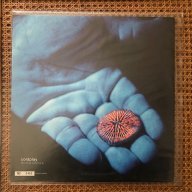
both the very minimal promo & the cover with the hand underwater with the coral.


I met Chris Martin & the rest of the band a few times

& Chris gave me a book of his on David Doubilet,


you can read about all this in a nice post in 2010 here


http://timeline.coldplay.com/article/art-history-3-blue-room-ep/


I have 2 copies of early covers I designed for the blue room e.p.

one of which is the very first copy - Limited edition 001


its been a long time since I did this work & its time to sell these items

as I am clearing up my studio for 2020.


I hope to lay my hands on a few of the CD mailers I created & 1 or 2 of the blank covers


Please get in touch if you are interested in these covers...


I would like to know where best to sell these records

because I would like them to end up with an avid collector of Coldplay material.


As I am not used to this forum can anyone give me advice on where

to post this .... full


My very Best to you all ~


Tim Moore

IMG_3688.thumb.jpg.bea9e12f717975c5422875073d4adc6c.jpg

IMG_3687.thumb.jpg.1885d47f52b399006b939754385834af.jpg

IMG_3686.thumb.jpg.ff9e648f5e18fdb2cdc68b6733432c02.jpg

IMG_3685.thumb.jpg.4ce15a3194898657116c92cf52777a38.jpg

IMG_3684.thumb.jpg.d364b1c4f906cc8918362b1a7bcb74de.jpg

IMG_3683.thumb.jpg.9d5e1dcaeba8cf8ccd0793e0c9dc0448.jpg

Create an account or sign in to comment

Account

Navigation

Search

Search

Configure browser push notifications

Chrome (Android)
  1. Tap the lock icon next to the address bar.
  2. Tap Permissions → Notifications.
  3. Adjust your preference.
Chrome (Desktop)
  1. Click the padlock icon in the address bar.
  2. Select Site settings.
  3. Find Notifications and adjust your preference.