LelieJens
Members
-
Joined
-
Last visited
Everything posted by LelieJens
-
Guys!!!! A legal way to preview Daddy hahaha Omg that sounds incredible I'm crying
-
Yup! It's quite rough to wait another week knowing that the album is out there, but I think I can handle it.
-
Spotify?
-
Damn that one hit pretty hard. You totally convinced me now.
-
That's a good one actually. Okay I've decided: I'm going to wait until both of the live performances are finished, and only then I'm going to listen through the album
-
Ahhhh but I think it would ruin the live performance surprise, wouldn't it?
-
Yeah I have the same thought. I would really like someone to convince me to listen to it before or just wait until the live performance.
-
I'm doing my best to wait until the official release, but its harddddddddd
-
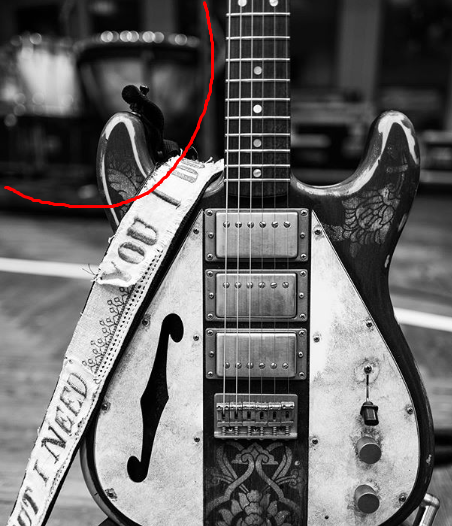
I think they were planning on playing VLV even before the poll. In this photo of the guitar, you can clearly see timpani in the background (and even the bell above? Not sure about that though). Would love to hear Sparks, but I think they already knew VLV was going to win.
-
1. AROBTTH 2. Parachutes 3. GS 4. Viva 5. MX 6. AHFOD 7. X&Y With the current songs, I would put EL above GS but underneath Parachutes.
-
Has anyone mentioned that the "Woo woo" part are possibly sirens going off because of a bombing? Or is this already covered somewhere? About the "glitch" around 1:46, as MosesTheMarshmallow said, it is probably just a transition from Jonny to the chorus. I think it's pretty cool.
-
What a great video! I love how (Moses?) does the "Boom Ka" in the video. It's great that it is more a video and less a song with some footage.
-
The two songs are magical. I'm so glad and thankful I am alive.
-
Could be! But Daddy is also a nickname of a member of (I think) the Wedding Band they mentioned on the poster. It's mentioned somewhere in this thread.
-
The "explicit content" is probably for the song "Guns", someone mentioned that before and I think it will be the only explicit song... ...although an explicit Daddy is always welcome.
-
We don't know the chorus yet, which starts after "she says", maybe that's sending a message.
-
So, not a theory but a cool thought. Coldplay is really travelling through time: 1. They send an old picture with a handdrawn date 2. They send letters written with a typewriter 3. They put simple adverts in newspapers 4. (something else on its way?) 5. (soon?) Digital ads and release! 6. Flying cars and self tying shoes!
-
I think "one very careful owner" means that the double album is actually 2 in 1. So "double album for sale" means that there will be 2 albums for sale "one careful owner" means that both are packaged in 1 "album".
-
That makes it clear! Luckily I haven't shared anything on here phew
-
Yup, this one here: [MEDIA=twitter]1186976004142784512[/MEDIA] View: https://twitter.com/ultrasubversive/status/1186976004142784512
-
Yes. I don't think anyone can fake this haha
-
Yeah! I am a little bit sad that we don't get to hear Life Is Beautiful in its studio version probably :(
-
Whew the Arabesque snippet sounds pretty interesting... EDIT: Am I allowed to share them here?
-
That explains the blank song in the tracklist!
-
Could you generate a Discord invite for me please? :)