


Skip to content
View in the app

A better way to browse. Learn more.

Coldplaying

A full-screen app on your home screen with push notifications, badges and more.

To install this app on iOS and iPadOS
  1. Tap the Share icon in Safari
  2. Scroll the menu and tap Add to Home Screen.
  3. Tap Add in the top-right corner.
To install this app on Android
  1. Tap the 3-dot menu (⋮) in the top-right corner of the browser.
  2. Tap Add to Home screen or Install app.
  3. Confirm by tapping Install.

E-OR

Members
  • Joined

  • Last visited

  1. Is it possible it was already filmed in Amman? I guess someone had to see them at the airport or something.
  2. Ah sorry, I thought the eclipse icon is new, my bad, anyways it still makes a bit of sense (even if a bit less haha)
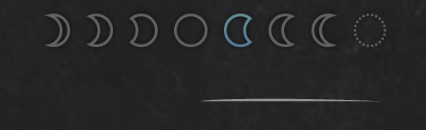
  3. I have a little theory if anyone in need for another one haha Anyways, They started to use the "solar eclipse" emoji combination on some videos on YouTube, also earlier this week they added the new moon\"eclipsed" icon to the little moon phase graphic on the website. The next new moon will occur on Monday the 28th of October, so I guess something will be released that day, or at the weekend prior to that (as singles usually being released on Fridays nowadays)
Account

Navigation

Search

Search

Configure browser push notifications

Chrome (Android)
  1. Tap the lock icon next to the address bar.
  2. Tap Permissions → Notifications.
  3. Adjust your preference.
Chrome (Desktop)
  1. Click the padlock icon in the address bar.
  2. Select Site settings.
  3. Find Notifications and adjust your preference.
