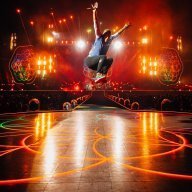
March 14, 201016 yr Hello guys, can anyone point me out to some links of high quality pictures of the band singing LiT ii during VLV Tour (preferably Latin American leg) - I know I saw some pictures of the screen full of color some days ago, but can't find them now...THANKS!!!
March 14, 201016 yr I've got a boat load of pics of them (with the screen fully intact behind them) from several US shows, but no Latin American ones. If you'd like them, let me know and I'll post them. :)
March 14, 201016 yr Oh, when I was at the concert and LITii started, first I was like: 'Fuck, the end' and then I thought: 'no, i have to enjoy it' and then I saw the background and I was like: 'woaah! :o that's pretty damn amazing!' and then I started to film :P
March 14, 201016 yr Author I would be awesome to find those videos from the Viva la Vida tour! LiT ii and Lovers in Japan especially!!!
March 14, 201016 yr Author just asked The Oracle to make the videos available (since Viva era is over)



Create an account or sign in to comment