




I ran away
Moderators
-
Joined
-
Last visited
Everything posted by I ran away
-
I don't like it when people try to peek into what you are looking at on your smartphone and I always try to lower the brightness to have a bit more privacy. I also try not to glance at other people's phones, even though yes, I admit it is like a magnet for the eyes especially when you are bored :P If I saw someone next to me reading Coldplaying though, I would definitely start talking to that person :D I bought a few on ebay once. If you give me your address, I actually could send you one. It fits in a standard letter !
-
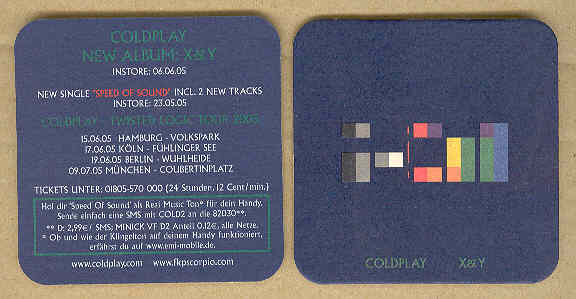
Today's random Coldplay thing: Because I frequently drink coffee at my workplace and I wanted to make my desk nicer I brought my X&Y coaster there and use it to put mugs or glasses on. And it gives me a small happy feeling every time I see it :) It looks like that: (this is not mine, it's a photo from the internet showing both sides) Anyway, today my boss was standing at my workplace discussing something with me and he said "nice coaster" ! Now I don't know if just meant the blue colour (there is a mug on it mostly anyway, so not sure he ever even saw the design) OR the design OR he recognized it as Coldplay. Hm. Two days ago he used the phrase "your guess is as good as mine". I'm pretty sure it's all coincidences but I'll keep my ears open :P
-
Thank you for disturbing my peace of mind and providing content for my frequent nightmares. :P
-
Chrisaurus :D Is gonna be the nicest and most awkward dinosaur ever ! Well yeah, genome manipulation sounds good. Let's do some ChRISPR-Cas9 ! (If you wonder what I'm talking about, google CRISPR-Cas9. It's a comparatively new genome editing technique that has conquered labs around the world in just a few years. Will get a Nobel Prize within the next ten years, I would bet on that)
-
A Whisper 6 Another's Arms 4
-
I saw it, but I have forgotten the line I posted...:eyes: Let me think...
-
Meet me again in the Rain
-
But some numbers are better than others, oh no... :)
-
If I send you a DNA extraction kit, can you send the sample back to me ? I want to compare it to his DNA in the AHFOD Era from the artwork and discover the gene for poppy music taste. :p
-
And be (good) to you
-
And may I ask which number is it ? :P
-
After Guy mentioned it, i checked your profile and its written there, so maybe Guy saw it there ? Oh, and AROBTTH is your favorite album ?
-
A Whisper 6 Another's Arms 4
-
Wow you got Chris's harmonica ???!!! Lucky you !!!!
-
A Whisper 6 Another's Arms 4
-
I always look at word/sentence structure and if I can find a particular combination that does not leave many possibilities. Here I noticed this: I■ ■■■'■e Thought the second one must be you've or you're and the first one In, If or It. If you've or If you're make sense, so I looked for Coldplay lines that begin with either of these. ??? ???? ???'?? ??? ???? ???? ???'? ???? ??? ?????
-
If the sky's gonna fall down, let it fall on me If you're gonna break down, you can break on me
-
Good find ! Happy belated birthday then @Nie ! :)
-
Don't you wish that life could be as simple
-
A Whisper 6 Another's Arms 4
-
-
-
-
-
Oh, good that it wasn't worse. Stay safe my friend :)

