M Marks The Spot
Members
-
Joined
-
Last visited
Everything posted by M Marks The Spot
-
-
-
I'll PM you.
-
-
-
The Scientist vs Something Just Like This
-
The Scientist vs Talk (Junkie XL Remix)
-
Rollercoaster
-
Cucumber is a kind of fruit? I thought it was a vegetable. :joy:
-
Midnight (Instrumental) vs Daylight (Instrumental)
-
L
-
Midnight vs See You Soon
-
That's an interesting discovery, indeed...
-
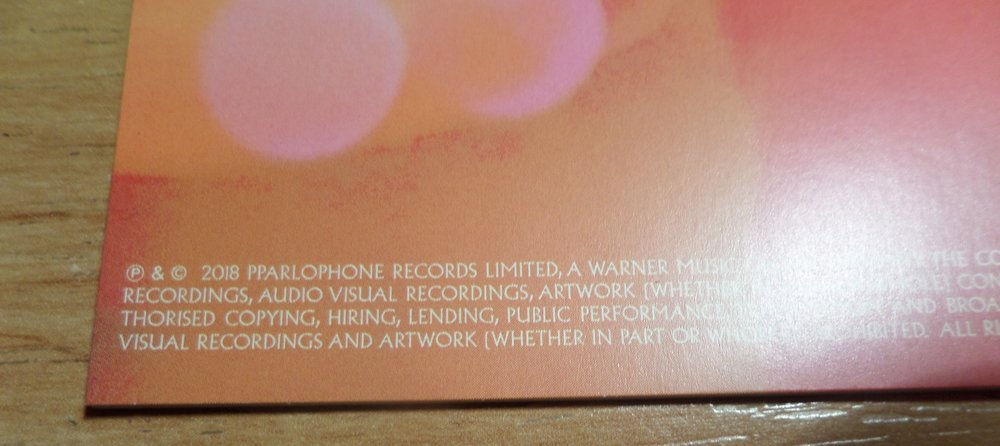
I have the 2CD+2DVD version and there's this typo on the back cover of the booklet as @AMDB9 mentioned. (You can see it in the first line.)
-
Ink vs High Speed
-
Today when I was outside. When was the last time you had come to school hours earlier before the first lesson began?
-
You're right! It must have been a typo surely. (Or it has a secret meaning as PP stands for product placement? I don't think so. :joy:)
-
You're right. There's something similar between those two songs. Don't Let It Break Your Heart vs Up With The Birds
-
Glass Of Water vs True Love
-
-
i
-
Um... Sometime two weeks ago... :joy: When was the last time you tidied your room?
-
Glass Of Water vs Moving To Mars
-
-